Free template · In Lean: 8 wastes checklist
8 Wastes Checklist: spot the waste in office work
What it is and when to use it
An 8 wastes checklist for office work: the eight kinds of waste in plain words, two signs and a quick test for each, a tally, and a log of what you saw.
A checklist for going to see office work as it really happens, with the eight kinds of waste in plain words and the Lean term beside each. Page 1 gives two typical signs and a quick test for every waste, a column to tally what you see and a column for notes. Page 2 is a log with one row per thing you saw. Use it while following one real item through the people and tools that touch it.
Download
Blank, ready to print or fill in on screen. No account, no email.
- PDF, A4 104 KB
- PDF, US Letter 104 KB
- Markdown (.md) 4 KB
- Excel (.xlsx) 7 KB
Free to use, change and share, also at work, under CC BY 4.0. Keep the line “Template by KaizenProof” on copies you share.
Preview
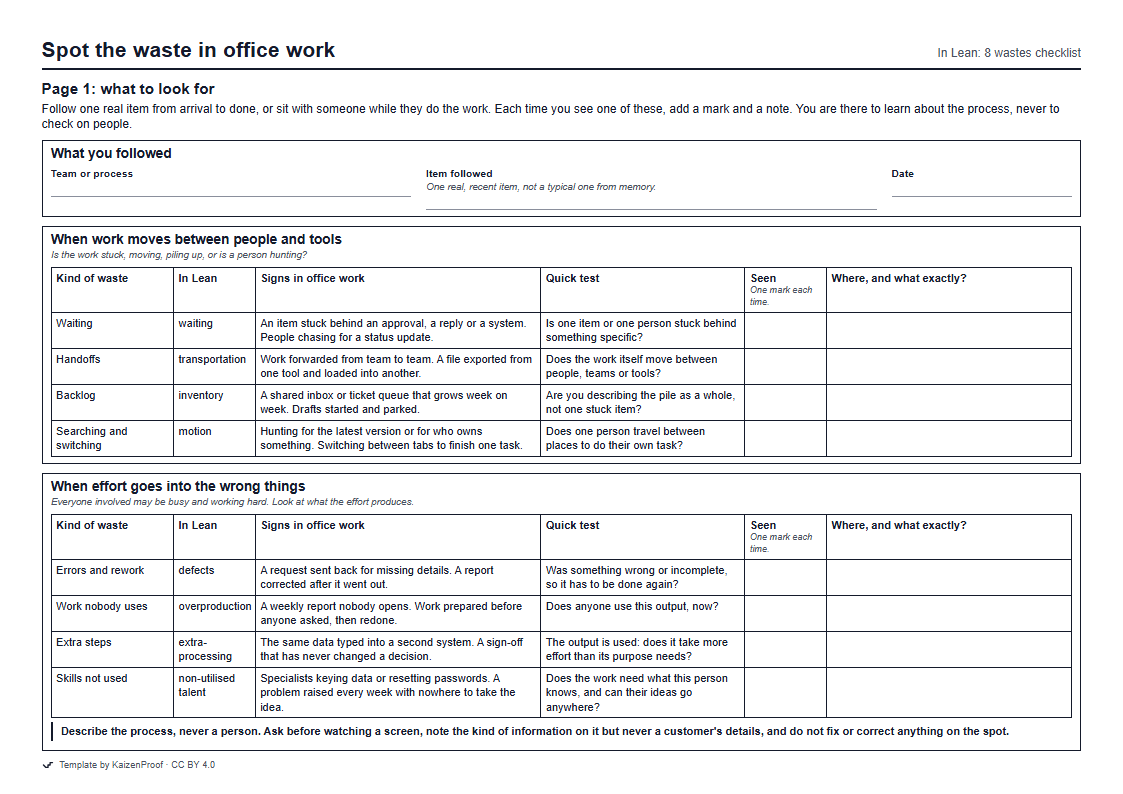
How to fill it in
- What you followed Write which team or process you are looking at, and pick one real, recent item to follow from start to finish.
- When work moves between people and tools As you follow the item, ask what is happening to the work. Each time you see one of these four, add a mark and a short note on where. Use the quick test to tell them apart: if the item travels it is Handoffs, if the person travels it is Searching and switching.
- When effort goes into the wrong things Do the same for the four kinds of wasted effort. To separate Work nobody uses from Extra steps, ask whether the output is used at all.
- Seen where the work is done For each thing you saw, write the step and the tool, what happened to the work, the kind of waste, and how you know. Describe what happened, never who was slow.
- Afterwards Show your notes to the people doing the work and add what they say you missed. Then choose one thing to write up first as a problem.
An example, filled in
Illustrative example, not a real company.
A team lead in accounts payable follows one supplier invoice from the shared inbox to payment.
What you followed
- Team or process
- Accounts payable
- Item followed
- One supplier invoice received on Monday
- Date
- 2026-10-13
When work moves between people and tools
- Table
Kind of waste In Lean Signs in office work Quick test Seen Where, and what exactly? Waiting waiting An item stuck behind an approval, a reply or a system. People chasing for a status update. Is one item or one person stuck behind something specific? II Four days waiting for the budget holder's reply; the supplier emailed twice to ask. Handoffs transportation Work forwarded from team to team. A file exported from one tool and loaded into another. Does the work itself move between people, teams or tools? III Inbox to the AP clerk, to the budget holder by email, back to the clerk. Backlog inventory A shared inbox or ticket queue that grows week on week. Drafts started and parked. Are you describing the pile as a whole, not one stuck item? I Shared inbox holds about two hundred unread invoices on a Monday. Searching and switching motion Hunting for the latest version or for who owns something. Switching between tabs to finish one task. Does one person travel between places to do their own task? II Clerk searched the org chart and an old spreadsheet to find the budget holder.
When effort goes into the wrong things
- Table
Kind of waste In Lean Signs in office work Quick test Seen Where, and what exactly? Errors and rework defects A request sent back for missing details. A report corrected after it went out. Was something wrong or incomplete, so it has to be done again? I Invoice had no purchase order number; clerk asked the supplier to reissue it. Work nobody uses overproduction A weekly report nobody opens. Work prepared before anyone asked, then redone. Does anyone use this output, now? Extra steps extra-processing The same data typed into a second system. A sign-off that has never changed a decision. The output is used: does it take more effort than its purpose needs? I Invoice details typed into the payment system and again into a tracking sheet. Skills not used non-utilised talent Specialists keying data or resetting passwords. A problem raised every week with nowhere to take the idea. Does the work need what this person knows, and can their ideas go anywhere?
Seen where the work is done
- Table
No. Which step, in which tool? What happened to the work? Kind of waste How do you know? 1 Shared inbox, email Invoice sat unopened for a day among about two hundred others. Backlog Received time against opened time in the inbox. 2 Org chart and old spreadsheet Clerk spent several minutes finding who holds the budget. Searching and switching Watched on a screen share. 3 Email to budget holder Request waited four days; no reminder exists. Waiting Email dates. 4 5 6 7 8 9 10
Afterwards
- Which one thing you saw will you write up first as a problem?
- Finding the budget holder for each invoice: it happens on every invoice and starts the four-day wait.
Common mistakes
- Labelling by feeling. Everything slow feels like Waiting. Ask what is actually happening to the work before you put a mark against it.
- Turning the walk into an inspection. People who feel judged show you the version of the process they think you want, and hide the workarounds you came to see.
- Fixing things on the spot. Note it and talk later; a fix made in passing skips the question of whether the step should exist.
Learn the method
Related guides
Try it on your own work
Pick one task that wastes your team's time every week and describe it in a sentence. KaizenProof names the waste, asks why until you reach the cause, asks whether the step should exist, and writes the change. No account is needed to start.