Free template · In Lean: A3 problem solving
A3 Problem Solving Template: one problem on one page
What it is and when to use it
An A3 template for office teams: one problem on one landscape page, from background and facts to cause, a countermeasure and checks at day 7, 14 and 30.
An A3 sheet tells the story of one problem on a single landscape page: why it matters, the facts, what causes it, what will change and how you will know whether the change held. The left half is about understanding; the right half is about acting, and it starts by asking whether the step should exist at all. Draft it early, show it to the people who do the work, and expect several rounds.
Download
Blank, ready to print or fill in on screen. No account, no email.
- PDF, A4 96 KB
- PDF, US Letter 96 KB
- Markdown (.md) 3 KB
- Word (.docx) 6 KB
Free to use, change and share, also at work, under CC BY 4.0. Keep the line “Template by KaizenProof” on copies you share.
Preview
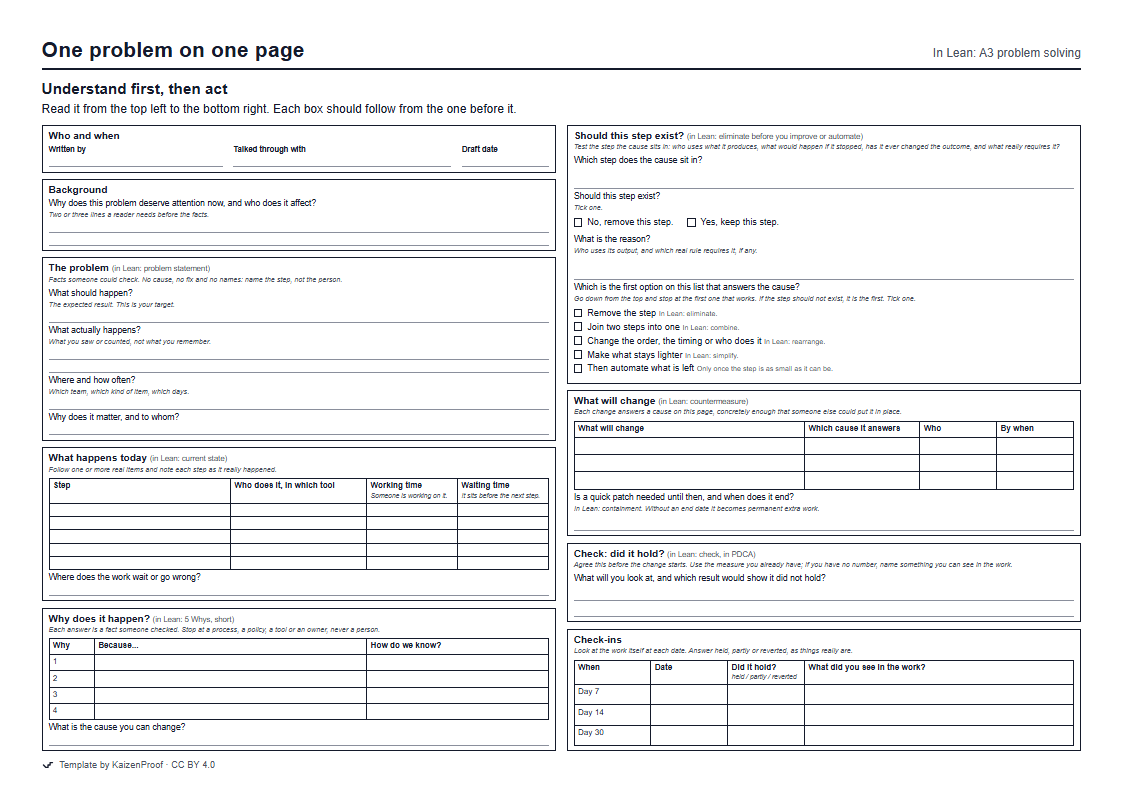
How to fill it in
- Who and when The author is the person closest to the problem. Note who you have talked it through with; the list should grow with each draft.
- Background Two or three lines: why this problem, why now, and who it affects.
- The problem Write what should happen and what actually happens, where and how often, and why it matters. Facts only. A cause, a fix or a name in this box ends the analysis before it starts.
- What happens today Follow real items and write down each step as it happened, who did it and in which tool, how long someone worked on it and how long it waited. Then say where it waits or goes wrong.
- Why does it happen? Run a short 5 Whys from the problem, with how you know beside each answer. End at something the team can change.
- Should this step exist? Name the step the cause sits in and test it: who uses its output, what would happen if it stopped, has it ever changed the outcome, what requires it. Tick the answer and give the reason. Then go down the list from Remove the step and stop at the first option that answers the cause.
- What will change Write each change, the cause it answers, who does it and by when. If the problem must be held back today, note the quick patch and its end date.
- Check: did it hold? Before the change starts, write what you will look at and which result would show it did not hold.
- Check-ins At about a week, two weeks and a month, look at the work and write held, partly or reverted, with what you saw.
An example, filled in
Illustrative example, not a real company.
A facilities coordinator at a small professional-services firm writes an A3 about meeting rooms booked for external visitors.
Who and when
- Written by
- Facilities coordinator
- Talked through with
- Two receptionists, the office manager
- Draft date
- 2026-10-14
Background
- Why does this problem deserve attention now, and who does it affect?
- Visitors arrive to find no room ready or their name missing at reception. Clients have mentioned it twice this month.
The problem
- What should happen?
- A visitor arrives to a booked room and their name is on the reception list.
- What actually happens?
- Of the last twenty-five visits, seven visitors were not on the reception list and four rooms had been booked by someone else in the meantime.
- Where and how often?
- Visits booked by email to the office manager; visits booked through the room calendar had no problem.
- Why does it matter, and to whom?
- Visitors wait in the lobby, and hosts lose the first part of the meeting.
What happens today
- Table
Step Who does it, in which tool Working time Waiting time Host emails the office manager Host, email 2 min up to 2 days Office manager books the room Office manager, room calendar 3 min none Office manager forwards the name to reception Office manager, email 1 min until reception reads it Reception adds the name to the list Reception, spreadsheet 2 min none - Where does the work wait or go wrong?
- Bookings wait in the office manager's inbox, and names are lost between the forwarded email and the reception list.
Why does it happen?
- Table
Why Because... How do we know? 1 Visit requests come by email to one person, not into the room calendar. The seven missed visits were all email requests. 2 Hosts were never shown that the room calendar has a visitor field. Asked five hosts; none knew the field existed. 3 The calendar sends visitor names to nobody, so the email route was kept for reception. Calendar settings: no notification is set up. 4 - What is the cause you can change?
- The visitor field in the room calendar notifies nobody, so bookings still go through one inbox and a forwarded email.
Should this step exist?
- Which step does the cause sit in?
- The office manager re-booking and forwarding each email request.
- Should this step exist?
- Ticked: No, remove this step.
- What is the reason?
- Nobody needs the email itself; the calendar already holds the booking. No rule asks for the office manager to be involved.
- Which is the first option on this list that answers the cause?
- Ticked: Remove the step
What will change
- Table
What will change Which cause it answers Who By when Hosts book rooms and visitors directly in the room calendar's visitor field. One inbox, forwarded names Office manager 2026-10-21 The visitor field sends a daily list to the reception inbox. Names reach nobody Facilities coordinator 2026-10-21 - Is a quick patch needed until then, and when does it end?
- Until then, reception checks the office manager's forwarded emails each morning. Ends on 21 October.
Check: did it hold?
- What will you look at, and which result would show it did not hold?
- Every visit in the following month: is the visitor on the list and the room free? One missed visitor booked through the calendar means it did not hold.
Check-ins
- Table
When Date Did it hold? What did you see in the work? Day 7 2026-10-28 held All six visitors were on the list. Day 14 Day 30
Common mistakes
- Writing the right half first. Choosing the fix and then filling the left half to justify it makes boxes that look complete and prove nothing.
- Treating it as a report for sign-off. An A3 supports a conversation; it is drafted early, changed often and never filed after one round.
- Cramming several problems onto one sheet. If the story will not fit on one page, the problem is too big: split it.
Learn the method
Try it on your own work
Pick one task that wastes your team's time every week and describe it in a sentence. KaizenProof names the waste, asks why until you reach the cause, asks whether the step should exist, and writes the change. No account is needed to start.